

Last Updated on May 28, 2026
You already know how comfortable it is, because you have ever made a purchase online. You place your order by clicking on Buy Now, typing in your card details, and the purchase is confirmed within several seconds. However, things are also occurring behind the scenes, and each movement has to be swift, safe, and precise.
As an ecommerce business owner, it is valuable to learn the online operations of credit card payments. It assists you in selecting the appropriate platform, lowers payment non-receipts, provides protection to your customers, and boosts conversions. At eCommerce Manager, we want to ensure that all these things are easy to grasp so that you can create, expand, and develop your store without any form of doubt.
Before we begin, here’s something many new sellers also ask:
Some want to buy ready-made stores and search for where to buy an ecommerce business. Others compare costs and ask how much does Wix ecommerce cost. All of these money questions are connected to payments, because once your store is live, the next big step is accepting credit card payments smoothly.
Let’s break it down in easy language.
What Happens When a Customer Pays Online?
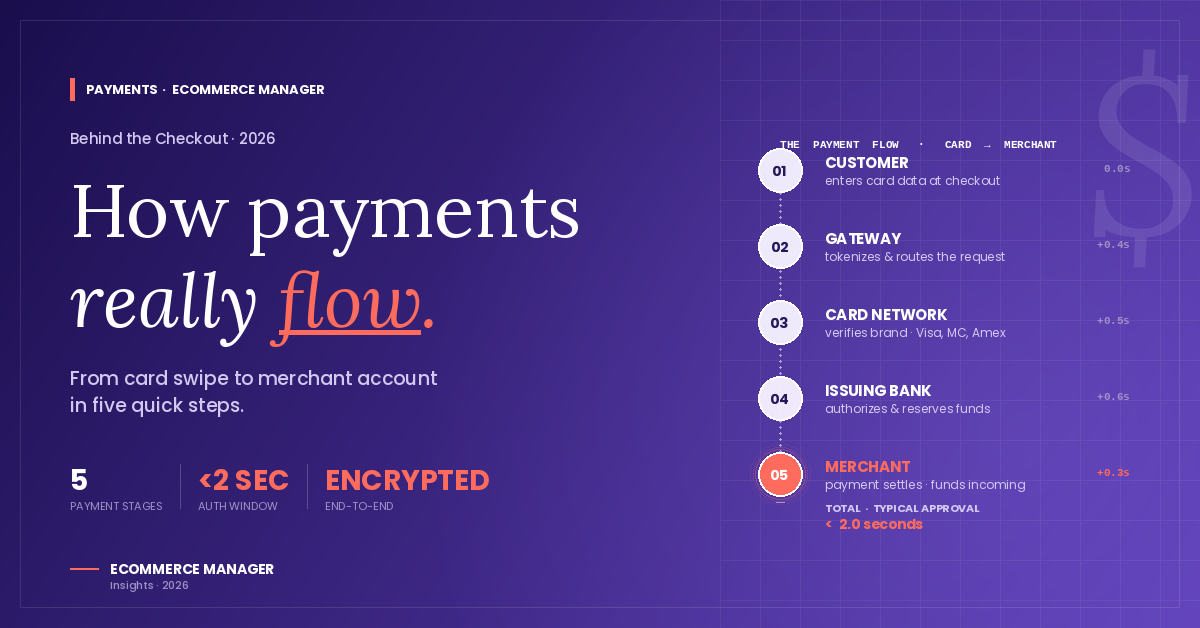
When a customer enters their card details on your website, several systems start working instantly. Even though this whole process takes only a few seconds, here are the main steps happening in the background.
1. The Customer Checks Out
The buyer adds products to their cart and goes to checkout. They enter their name, card number, expiry date, and CVV.
2. The Ecommerce Website Sends Data to the Payment Gateway
Your website does NOT process the card directly. Instead, the information goes to a payment gateway — a secure digital middleman.
Popular gateways include:
- Stripe
- PayPal
- Square
- Shopify Payments
- Razorpay
The gateway checks the card details and makes sure everything is encrypted and secure.
3. The Payment Gateway Talks to the Bank
Once the gateway gets the information, it sends it to the customer’s bank (called the issuing bank).
The bank checks:
- Is the card valid?
- Does the customer have enough balance?
- Is the transaction safe?
- Has the card been flagged for fraud?
4. The Bank Approves or Declines the Payment
If everything looks good, the bank sends back an approval message. If there is an issue, the message will be declined.
5. The Customer Sees “Payment Successful”
When the bank approves the payment, your website instantly shows confirmation.
6. The Money Moves to Your Merchant Account
The payment gateway sends the amount to your merchant account, where the funds stay temporarily.
7. The Funds Move to Your Business Bank Account
After a settlement period (usually 1–3 days), the money gets transferred to your business bank account.
And that’s how ecommerce websites process payments — quickly, securely, and mostly automatically.
Why Do You Need a Payment Gateway?

A payment gateway protects both you and your customers. It encrypts card details, blocks fraud, and makes sure sensitive information never stays on your website.
Without a payment gateway:
- You can’t accept credit cards
- Your store is unsafe
- You risk major financial penalties
This is why every ecommerce platform recommends using trusted gateways.
How Ecommerce Platforms Handle Credit Card Payments
Different ecommerce platforms support different payment systems. Let’s look at the most popular ones.

Shopify has its own built-in system called Shopify Payments. It also supports Stripe, PayPal, and others.

Many people ask how much is Wix ecommerce or how much does Wix ecommerce cost because Wix offers great payment processing tools at beginner-friendly prices. Wix Payments supports cards, wallets, and even Buy Now Pay Later (BNPL) services.

Since WooCommerce runs on WordPress, you can choose from multiple gateways like Stripe, PayPal, Square, and more.

BigCommerce gives access to dozens of gateway partners, and the platform does not charge extra transaction fees.
All of these platforms make payment processing secure and simple for store owners, even if they are not tech experts.
What Happens If a Payment Fails?
Payment failures are very common online, and they can happen for many reasons:
- Card expired
- Not enough balance
- Wrong CVV
- Issuer bank declines
- Gateway technical issue
- Customer enters incorrect information
- Fraud detection blocks the transaction
Good ecommerce platforms help you reduce failures by:
- Allowing multiple payment methods
- Using AI to detect and prevent fraud
- Offering smart retries
- Showing friendly error messages
Even small improvements here can increase your conversions.
Security Protocols Used in Online Payments
To keep online payments safe, several global security standards are used. Here are the most important ones.
SSL Encryption
This protects card details during the checkout process. If your site shows “https,” it is using SSL.
PCI-DSS Compliance
This is a global security rule all ecommerce businesses must follow. It ensures safe handling of card data.
Tokenisation
Instead of storing card numbers, payment gateways convert them into secure tokens.
3D Secure (OTP Verification)
For extra security, many payments require a one-time password (OTP) or biometric approval.
These layers keep customers safe and protect businesses from fraud.
How AI Is Changing the Payment World
Online payments are becoming smarter because of AI. AI now helps with:
- Fraud detection
- Risk scoring
- Automatic payment retries
- Checkout optimisation
- Personalised payment suggestions
This means smoother checkouts, higher approvals, and happier customers.
Choosing the Best Payment System for Your Ecommerce Store
Here are a few questions that can help you decide.
Do you sell globally?
Choose Stripe or PayPal.
Do you want the fastest setup?
Shopify Payments or Wix Payments.
Are you on WordPress?
WooCommerce + Stripe is the most popular choice.
Want the lowest fees?
Compare gateway fees in your country — they vary.
Want the easiest all-in-one solution?
Shopify is the most beginner-friendly.
Your choice depends on your business size, product type, location, and long-term goals.
What About Buying an Existing Ecommerce Business?
New sellers often ask where to buy ecommerce business because buying an existing store can help you skip the early struggles. Popular marketplaces include:
- Flippa
- Empire Flippers
- Shopify Exchange (shut down but alternatives exist)
- Acquire.com
Buying a store means payments are already set up, making it easier to start earning from day one.
Tips to Improve Your Online Payment Success Rate
Here are simple ways to reduce failed payments and improve your checkout experience.
1. Offer multiple payment options
Cards, PayPal, BNPL, UPI, wallets, etc.
2. Keep checkout clean and simple
Fewer clicks = more conversions.
3. Use a trusted payment gateway
Avoid unknown or risky providers.
4. Make sure your site loads fast
Slow checkouts cause abandoned carts.
5. Send reminder emails for failed payments
Customers often try again and complete the purchase.
6. Use AI fraud detection
This reduces risk and builds trust.
7. Show trust badges
Customers feel more secure when they see security icons.
Small changes here can bring big results.
Conclusion
Without smooth and secure payments, no ecommerce business can grow. Whether you’re a beginner or already running a store, understanding how this system works helps you make better decisions.
If you’re choosing your ecommerce platform, comparing gateways, or even wondering how much Wix ecommerce cost, knowing how payments work will guide you in the right direction.
Online payments may look simple, but behind the scenes, they’re a smart mix of banking, technology, and security. Thankfully, ecommerce platforms like Shopify, Wix, BigCommerce, and WooCommerce make everything easy for business owners.
Ready to Build a Store That Accepts Payments Smoothly?
If you want honest advice on ecommerce platforms, payment systems, or even where to buy ecommerce business, eCommerce Manager is here to guide you.
We help business owners choose the best tools, compare platforms, and build stores that convert better.
Want expert suggestions for your store?
Contact eCommerce Manager today and start building a secure, high-converting ecommerce business.