

Last Updated on May 9, 2026
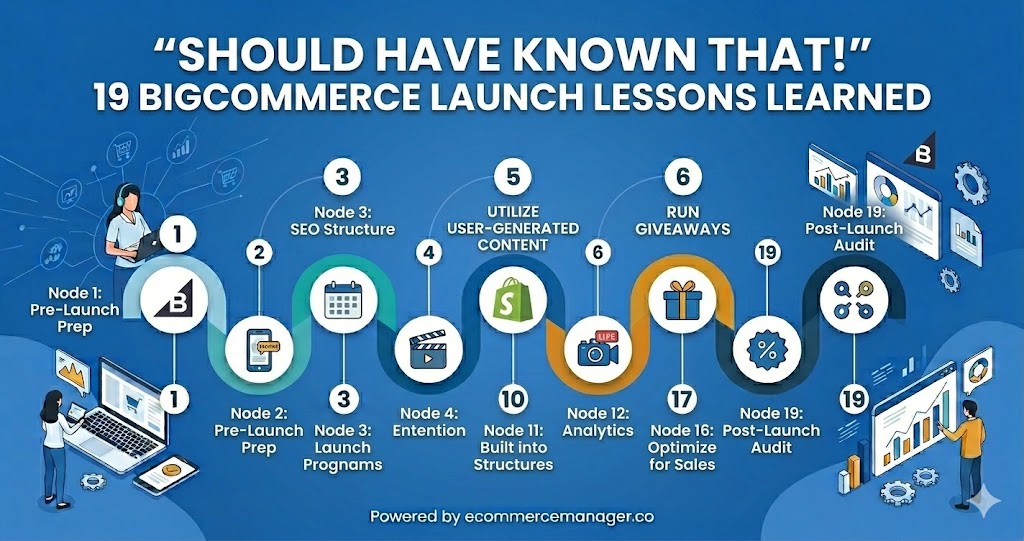
“Should Have Known That!” 19 BigCommerce Launch Lessons Learned
Launching a BigCommerce store involves far more strategic decisions than most merchants anticipate, from technical infrastructure to customer experience details that directly impact revenue. This article compiles 19 critical lessons from ecommerce experts and seasoned store owners who learned these insights through real-world launches and costly mistakes. These proven recommendations cover everything from API testing and inventory management to SEO structure and conversion optimization, giving new merchants a roadmap to avoid common pitfalls.
- Stress Test API Limits before Launch
- Validate Data Integrations Pre-Launch
- Leverage Marketplaces and Offer Native Payments
- Get Real Humans to Place Orders
- Secure a Direct Support Contact
- Build Fitment Decision Trees Upfront
- Audit Tags and Fix Mobile Speed
- Own Local Presence and Easy Calls
- Solve Inventory Sync before Demand Spikes
- Invest in Professional Photos and Details
- Favor Performance over Features for Rankings
- Streamline Transaction Flow and Resilient Plumbing
- Align Ad to Purchase Promise
- Set Clear Requirements and Real Timelines
- Prioritize Post-Purchase Communication and Status
- Bake SEO into Structure from Start
- Clarify Value and Conversion Message First
- Engineer Catalog Standards and URL Rules
- Design Faceted Filters from Customer Queries
Stress Test API Limits before Launch
In the past I would have focused on API limitations and technology agility during peak times. Before we started using BigCommerce, we originally thought that their infrastructure would allow for an infinite number of requests, but we had to discover that poorly written scripts could greatly increase the amount of time it took users to experience the site. The lesson learned was how important it is to have a synchronized digital toolchain. So now I advise developers that they need to do extremely extensive stress testing on their API calls prior to their go-live date to ensure that they maintain their primary control of the system during major sales events and that technical precision at the backend is the key to providing a high-performance, highly resilient storefront.

Validate Data Integrations Pre-Launch
Here’s some free advice for your BigCommerce launch: figure out your data integrations before you go live. I didn’t, and we ended up with order messes and wrong report numbers. After taking extra time to test everything, we caught a shipping plugin error early that would have wrecked our fulfillment. Trust me, that upfront work saves you a massive headache later.

Leverage Marketplaces and Offer Native Payments
If only I had known when I started my BigCommerce store how much of an impact marketplaces such as Mercado Libre would have on e-commerce. According to forecasts from various sources, Peru’s B2C e-commerce market is expected to exceed USD 100 billion by 2033. It was approximately USD 15-16 billion in 2024, with over 80% of all transactions occurring via mobile devices. However, independent stores are at a great disadvantage in building trust and traffic without a significant marketing investment.
Below are some key takeaways I learned the hard way:
Driving direct traffic is extremely difficult. It is estimated that marketplaces account for 60-70% of all e-commerce sales. I wish I had started selling my products on Mercado Libre while simultaneously establishing my brand and had allocated 20-30% of my budget to pay-per-click (PPC) advertising from day one.
If you do not offer local payment options on your website, you will experience high rates of cart abandonment, or “lost sales”.
Logistics is very difficult. For this reason, having multiple carriers and determining shipping zones based on realistic distances is extremely important when shipping to provincial areas.
Electronic invoicing through SUNAT is required by law, and mobile optimisation is essential for compliance. Both factors affect conversions in a mobile-first place.

Get Real Humans to Place Orders
I’ve launched hundreds of sites over 35+ years, and here’s what consistently bites people: they don’t get enough actual humans testing the site before launch. Everyone thinks automated testing tools catch everything, but they don’t. I learned this the hard way when a client’s form was technically “working” but sending submissions into a spam folder nobody checked for three weeks—we lost actual sales before someone finally tested it themselves.
Get your ex-girlfriend to look at it. Seriously. We had a furniture store owner’s teenage nephew find that their mobile checkout buttons were completely hidden on certain Android devices. The dev team had only tested on iPhones. Another time, a friend’s mom pointed out that nobody over 50 could read the gray text on a slightly less gray background—something the 30-year-old design team never noticed.
Test a real purchase with real money before you go live. Not a test transaction—an actual purchase. One of our Shopify clients found their discount codes were applying twice, essentially giving products away at 60% off instead of 30%. They would’ve hemorrhaged money if we hadn’t caught it during a live test purchase the night before launch.

Secure a Direct Support Contact
I learned a hard lesson about BigCommerce. A tiny theme issue knocked our site offline for hours because we didn’t know who to call. Now I have a direct number for a support person. When another problem popped up last month, we were back up in 15 minutes. If you’re just starting out, get to know someone on the support team now. Don’t wait for something to break.

Build Fitment Decision Trees Upfront
We wish we had known how fast parts complexity overwhelms storefront logic. HVAC catalogs look simple until variations create silent dead ends. We built a fitment questionnaire only after returns exposed gaps.
Start with a decision tree that mirrors technician thinking. Map every question to a SKU set and exclusion rules. Put that logic on category pages, not only on product pages. Also require serial or model inputs before showing compatible accessories. This reduces wrong carts and support tickets while raising conversion.

Audit Tags and Fix Mobile Speed
I wish I’d known that tracking and analytics setup needs to be bulletproof before you flip the switch. We launched an e-commerce site for a franchise client on BigCommerce, and their conversion tracking was firing on page loads instead of actual purchases. For three weeks, we thought we were crushing it—until we realized the data was completely wrong and we’d been optimizing toward garbage metrics.
We had to pause campaigns, audit every tag in Google Tag Manager, and rebuild the conversion funnel from scratch. Cost us about $4K in wasted ad spend and two weeks of momentum. Now I never launch without a full tracking audit: test purchases, event verification in GA4, and cross-checking revenue numbers against the actual CRM.
The other brutal lesson? Your site speed on mobile will kill you faster than bad creative. One client’s product pages were taking 8+ seconds to load because of uncompressed images and a bloated theme. Their paid traffic was solid, but bounce rate was 74%. We stripped it down, optimized images, and switched hosting—bounce rate dropped to 38% and conversions doubled in the same ad campaigns.

Own Local Presence and Easy Calls
I’ve built websites for over 20 years and launched my own agency in 2020, so I’ve seen plenty of platform launches go sideways. Here’s what I wish I’d known earlier that applies to any e-commerce platform, BigCommerce included.
**Local search optimization matters way more than you think.** When I started focusing on local businesses, I found that 46% of all searches are local, and “near me” searches have exploded by 500%+ in recent years. Most store owners obsess over their product pages but completely ignore their Google Business Profile and local directory listings. One of my HVAC clients saw their lead flow jump dramatically just by properly optimizing their local presence—even though they had a solid website already.
**Your conversion setup needs to be dead simple from day one.** I’ve seen businesses lose leads because their checkout process required too many steps or their “call now” button wasn’t prominently placed. We build one-click calling directly into search results for our clients, and the difference is massive. Don’t wait to streamline—78% of local searches result in an offline conversion, so if your contact process has any friction, you’re bleeding money.
**Track real metrics, not vanity metrics.** Early on, I got caught up in website traffic numbers instead of actual lead quality. Now we guarantee our clients 5 qualified leads because we learned that 10,000 visitors mean nothing if none of them convert. Set up proper conversion tracking from launch day, not six months later when you’re trying to figure out why sales are flat.

Solve Inventory Sync before Demand Spikes
Our biggest mistake? Not figuring out inventory integrations. Trying to keep our BigCommerce store synced with all our suppliers was a total nightmare. We sold out of a popular item and had to refund dozens of customers. That was a rough week. We finally found a good app to manage our stock, which fixed the problem. Get that sorted on day one so handling orders doesn’t become a headache.

Invest in Professional Photos and Details
My biggest mistake? Not spending more time on product photos and descriptions before we launched. Figuring out BigCommerce’s catalog was a pain, but it was crucial for jewelry buyers who zoom in on every detail. Good visuals meant fewer customer questions and more decisive purchases.
Honestly, hire a professional photographer and get all your specs right from day one. It saves you so much trouble later.

Favor Performance over Features for Rankings
I wish I’d known how much site speed actually matters for SEO on BigCommerce. I once added a bunch of fancy apps to my store and my rankings dropped because the site slowed down. Now I keep things simple and choose speed over extra features. If you’re starting out, test your site on different phones and computers all the time. It prevents so many problems later on.

Streamline Transaction Flow and Resilient Plumbing
One of the most critical lessons often overlooked before a BigCommerce launch is the sheer importance of optimizing the ‘Checkout Experience’ over the ‘Storefront Aesthetics.’ While a beautiful design builds initial brand trust, the actual conversion happens at the finish line; many merchants realize too late that complex shipping rules or a lack of localized payment gateways are major friction points for global customers. I wish more store owners knew that a successful launch isn’t just about going live, but about ensuring that your API integrations and data flows are stress-tested for scale before the first surge of traffic hits.
Prioritizing a seamless, mobile-first checkout process from day one will save you more revenue—and headaches—than any high-resolution banner ever could. Furthermore, understanding the nuances of the built-in SEO tools versus third-party apps early on allows for a much cleaner site structure that pays dividends in organic search long after the launch hype fades. Focus on the plumbing of the site first, and the decorations second.

Align Ad to Purchase Promise
I wish I’d known how critical message alignment is between your ad—landing page—checkout flow before launching e-commerce stores. We had a client (Corefirst) who was running ads with zero sales, and when we dug in, their messaging completely fell apart halfway through the buyer journey.
Their ads promised one thing, the landing page talked about something slightly different, and by checkout the customer was confused about what they were actually buying. We fixed the messaging to tell one consistent story from click to purchase, and they went from basically $0 to nearly six figures monthly within a few months.
The lesson: walk through your entire customer journey like you’ve never seen your brand before. If there’s any disconnect between what the ad says and what the page delivers—or if your value prop shifts even slightly—you’re bleeding conversions. We’ve seen 40%+ drop-off rates just from misaligned headlines between ad copy and landing pages.
Test the whole flow, not just individual pieces. One confused moment kills the sale.

Set Clear Requirements and Real Timelines
I learned this the hard way. You have to tell your own team upfront how long custom features will actually take. We kept getting burned because we assumed the standard software would handle our specific workflows. It never did. Write down what you absolutely need, get that list to the developers before they start, and you will avoid so many problems down the road.

Prioritize Post-Purchase Communication and Status
As a support manager, I never thought about how much the default transactional logic would dictate my support team’s workload during the first 90 days post-launch. With all the excitement around the visual theme, the real friction comes from gaps between when the customer gets their order confirmation and when they receive their delivery notification. If you do not proactively customize the automated triggers and self-service order tracking, you are voluntarily introducing a flood of “Where Is My Order?” tickets that will drain your operational efficiency.
We have consistently found that successful launches are all about prioritizing the post-purchase work flow above how pretty your home page is. This shifts your support from a reactive model to a proactive model in which your system answers the next question before the customer even thinks to ask it. Getting an early start on mapping out these communication triggers will help you avoid the burnout that can occur when a “successful” launch destroys your operations.
Launching an online store is a marathon of little decisions, and it can be easy to feel overwhelmed by the technical checklist. However, every order placed is tied to someone who is waiting for a confirmation that their purchase was a good decision. Once you complete the communication part properly, the rest of the tech stack becomes infinitely easier to manage.

Bake SEO into Structure from Start
If I were starting over, I’d do SEO from day one. I’ve seen how skipping simple things like clean URLs and a logical category structure leads to major ranking headaches down the road. Now we just build the store with that foundation from the start. It avoids a ton of technical fixes later and lets the site grow on its own much faster.

Clarify Value and Conversion Message First
As an agency that’s helped brands launch on BigCommerce and other platforms, one thing I wish more founders knew upfront is that traffic without conversion clarity is just expensive noise. A lot of teams obsess over theme design and paid ads before they’ve nailed their offer, positioning, and on-page messaging.
I’ve seen launches where the tech stack was flawless but the product pages were vague. No clear differentiator, no strong proof, no objection handling. The result was decent traffic and disappointing revenue. The hard lesson is that your store isn’t just a catalog. It’s a sales argument.
If I could rewind most launches, I’d spend more time on the first 30 percent of the funnel. Tight headline, crystal-clear value prop, sharp FAQs, and social proof that actually answers buyer doubts. Get that right, and everything else gets cheaper. Get it wrong, and you just pay more to learn the same lesson.

Engineer Catalog Standards and URL Rules
I wish I’d treated catalog data quality and URL strategy as “day zero” engineering work, not something to clean up after launch. On one BigCommerce implementation we inherited, inconsistent SKUs/options and ad-hoc category structures looked fine in the admin but caused duplicate products, broken filters, and messy redirects once traffic hit. Fixing it later meant re-imports, SQL-based cleanup in the PIM/ERP side, and a painful 301 mapping exercise–work that would’ve been cheaper if we’d locked down conventions up front.
The practical lesson: define a strict product/variant model (SKU rules, option naming, attribute taxonomy), freeze permalink rules, and run a full migration dry-run with automated validation before go-live. We typically back this with a simple .NET Core validation utility against our MS SQL source (and CI checks in TeamCity) so bad data never reaches the storefront.

Design Faceted Filters from Customer Queries
One thing I would have done differently was to get a better grasp on the way that BigCommerce handles complex product filtering for a catalog as technical as ours. When we first made the transition to BigCommerce, we didn’t realize just how much our customer base would rely on very specific product attributes, such as torso length or hydration compatibility, to find the gear they need. We set up a more standard approach to product filtering, only to quickly realize that hikers are looking for ways to find gear that are far more detailed than simply by price point or even color. The important lesson learned was that “standard” out-of-the-box solutions often require significant customization to meet the high intent level of your customer base. As a result, we had to go back and restructure our product data to support a far more robust approach to faceted product filtering, which ultimately helped improve the overall speed and experience for the customer. If I had my way, I would have spent more time auditing the most detailed customer queries to ensure that the overall platform architecture was more conducive to supporting those discovery paths for the customer. It’s taught us that the overall technical underpinnings of your store are just as important as the gear you are selling.

Related Articles
- 7 Lessons Learned from Failed Shopify Experiments
- Starting Out with BigCommerce? 7 Tips for Beginners
- 25 Piece of Advice for Starting an Ecommerce Business (and Why)