

Last Updated on June 7, 2026
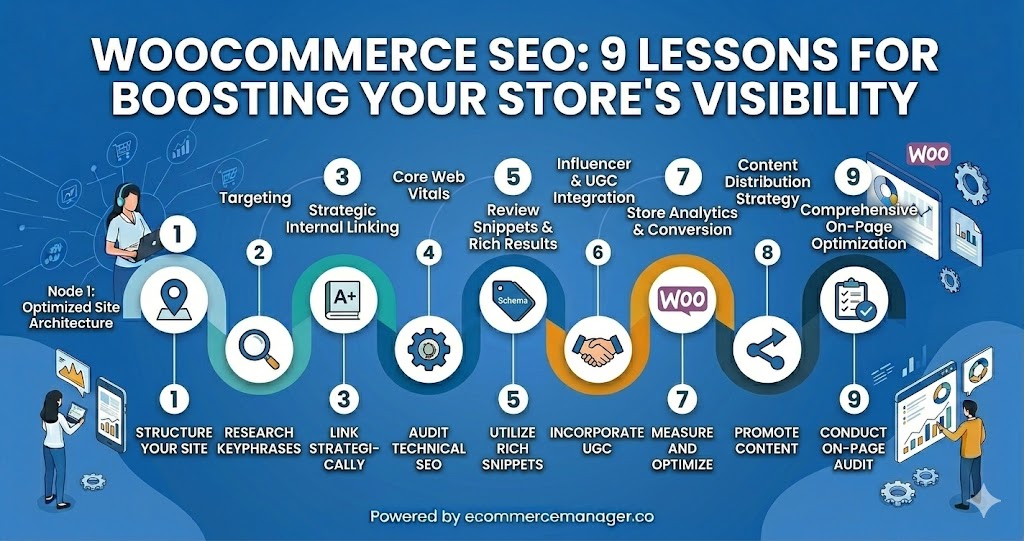
WooCommerce SEO: 9 Lessons for Boosting Your Store’s Visibility
Running a successful WooCommerce store requires more than just great products—it demands a strategic approach to search engine optimization that puts your store in front of ready-to-buy customers. This guide breaks down nine practical lessons that can transform your store’s visibility in search results, backed by insights from SEO experts who work directly with ecommerce businesses. These proven tactics address everything from technical site structure to product page optimization, giving you a clear roadmap for outranking competitors and capturing more organic traffic.
- Discipline Taxonomy And Catalog Attributes
- Consolidate Variants Under One Canonical
- Build Lean Intent Focused Gateway Pages
- Maximize Maps With Google Business Profile First
- Mine Search Logs For Customer Language
- Elevate Snippets With Clean Markup
- Write Specific Unique Descriptions That Sell
- Answer Fitment Questions To Drive Confidence
- Cut Bloat To Boost Visibility
Discipline Taxonomy And Catalog Attributes
One lesson that consistently changes WooCommerce visibility is this: category architecture and product data matter more than any SEO plugin.
I’ve seen stores obsess over meta titles and schema while their structure was working against them. When products live in poorly defined or overlapping categories — or worse, rely on thin, duplicated product descriptions from manufacturers — Google struggles to understand what the store actually specializes in.
In one case, a store had hundreds of products but no clear hierarchy and inconsistent attribute data. Everything sat one layer deep, and product variations weren’t structured intentionally. Once we rebuilt the category tree around buying intent and cleaned up product data (attributes, descriptions, internal linking), organic visibility improved without adding new content.
WooCommerce is flexible, but that flexibility can create SEO debt if taxonomy and product data aren’t disciplined from the start. Clear parent/child structure, consistent URL logic, unique product content, and structured attributes usually move the needle more than plugin tweaks.
For most stores, the breakthrough isn’t technical tricks — it’s giving search engines clean signals about what you sell and how it’s organized.

Consolidate Variants Under One Canonical
We learned the hard way that in WooCommerce, more product pages can actually hurt your rankings. We worked with an eCommerce client whose store had separate URLs for every size and color variation. The pages looked nearly identical, and Google struggled to decide which one deserved to rank.
Instead of keeping every variation indexed, we consolidated them under one primary product page and set up proper variation settings and canonical tags. That gave search engines a clear signal about which URL mattered most and stopped the ranking signals from being split across duplicates.
Within a few weeks, that main product page started climbing because all the authority and engagement were finally going to one place. The lesson was simple: in WooCommerce, clean structure beats page volume every time.

Build Lean Intent Focused Gateway Pages
One of the most valuable lessons I have learned regarding WooCommerce is that the standard functionality often creates a technical environment that is too heavy for efficient crawling, which directly stifles organic visibility. In my practice, the biggest impact on rankings didn’t come from writing more descriptions, but from aggressively optimizing the technical structure and the way the site communicates product data to search engines. Many store owners make the mistake of relying on the default WooCommerce setup, which generates a massive amount of “junk” pages through tags, redundant categories, and complex URL parameters for filters. These thin-content pages dilute your site’s authority and waste your crawl budget, often causing Google to overlook your high-margin product pages.
A strategy that fundamentally changed our results was shifting the focus from individual product pages to highly optimized category and “attribute” pages. In a typical e-commerce environment, individual products may go out of stock or be replaced, making them unstable targets for long-term SEO. However, a category page or a filtered result page for a specific brand or feature is permanent. By treating these “archive” pages as primary landing pages—adding unique introductory text, custom headers, and specific FAQ blocks—we were able to rank for much broader and more profitable search terms. This approach ensures that even if a specific product is discontinued, the “entity” of that product type continues to drive traffic to the store.
Another critical lesson is the power of high-fidelity schema markup. Most people think just having the “Product” schema is enough, but in 2026, you need to go much deeper by including detailed price valid-until dates, aggregate ratings, and specific shipping details directly in the code. This makes your snippets significantly more attractive in the search results and increases the likelihood of being featured in AI-driven shopping overviews. When you combine this “data-rich” technical layer with an interface that prioritizes speed and conversion above the fold, you create a store that search engines trust and users find easy to navigate. Ultimately, the success of a WooCommerce store depends on your ability to transform it from a generic template into a lean, data-dense machine that serves both the crawler and the customer with equal efficiency.

Maximize Maps With Google Business Profile First
With over 13 years driving $140M in tracked revenue for service businesses via Rhythm Collective, we’ve optimized countless WooCommerce sites integrated with local SEO strategies.
One key lesson: Prioritize Google Business Profile (GBP) optimization before on-site tweaks—it’s the fastest way to dominate local pack results for WooCommerce stores targeting “service near me” searches.
For PinPoint Roofing’s Knoxville WooCommerce store, we optimized their GBP with service keywords, photos, and citations, jumping them to top-3 in maps within 30 days—driving 40% more qualified traffic and steady lead flow.
This beats competitors by capturing the 3% ready-to-buy audience today, turning visibility into sales without heavy ad spend.

Mine Search Logs For Customer Language
I think the biggest lesson when it comes to WooCommerce SEO is that your internal search data is an entirely untapped resource for optimizing product pages, and most people simply overlook it. Believe it or not, anywhere from 15% to 30% of visitors to a WooCommerce store will use the search function and those search terms are telling you exactly what real consumers searching for your products are typing…which is rarely ever what your products titles and descriptions are written in!
I would estimate that taking those internal search terms and using them for your product page H1s, meta descriptions, and schema markup can increase organic traffic to those pages 20% to 40% in 60-90 days with zero cost. Customers are literally telling you what words they type into Google. You might as well listen.

Elevate Snippets With Clean Markup
We learned a valuable lesson by focusing on feed quality for rich results instead of chasing more keywords. For our client’s WooCommerce store, the products were great, but the structured data was messy. We standardized product titles, brand fields, availability, and review markup so that every item told the same story. This helped Google better understand the catalog and increased qualified clicks.
Next, we improved image SEO by focusing on user intent. We named images based on what shoppers search for, not using internal SKU language. We also made sure the first image on the page matched the primary variant and loaded quickly. With cleaner snippets and more consistent image appearances, the visibility of the store rose without the need to add more pages.

Write Specific Unique Descriptions That Sell
One valuable lesson I’ve learned about SEO for WooCommerce is the importance of product descriptions. At first, I thought it was enough to just list the product features, but I quickly realized that well-written, unique product descriptions make a huge difference.
For example, instead of just saying “red running shoes,” I started adding more detail like, “These red running shoes are lightweight, breathable, and designed for comfort on long runs.” This not only makes the product sound more appealing to customers, but it also helps with search engine rankings.
It’s all about being specific, clear, and including keywords naturally. By focusing on creating descriptions that help both customers and search engines, I noticed an increase in traffic and better visibility in search results.

Answer Fitment Questions To Drive Confidence
The biggest SEO lesson for my WooCommerce store (Extreme Kartz) has been this: don’t treat product pages like “listings”–treat them like answers. We win visibility by building pages around fitment and expectations (“will this fit my Club Car / EZGO / Yamaha?”), not just keywords and specs.
Once I shifted our structure to problem – solution – product (buyer guides, comparisons, and FAQs that internally link into the exact collections), organic traffic got more qualified. People land knowing what works/what doesn’t, which reduces confusion and bad-fit purchases–huge in upgrades like lithium battery conversions and performance controller installs.
The practical move: every high-intent category gets its own “decision layer” above the products–compatibility notes, common install limitations, and who it’s for. I also standardize fitment language across pages so Google (and customers) see consistent model/usage context instead of generic copy.
I’m well-positioned to say this because since taking ownership in 2022, I’ve focused our growth into a nationwide eCommerce platform by prioritizing compatibility accuracy, technical support processes, and educational content tied directly to real-world upgrade use cases. That clarity has been a bigger SEO lever for us than any plugin tweak.

Cut Bloat To Boost Visibility
One of the most valuable lessons I have learned about SEO for WooCommerce is this: your biggest ranking problem is usually not keywords. It is bloat.
We all know WordPress is powerful. That is why we love it. WooCommerce is no different. It comes with features, extensions, dynamic cart fragments, scripts, styles, and functionality for any store scenario. The problem is that most e-commerce brands do not need all of it.
I tell clients this all the time. Choosing to run every default WooCommerce feature on a small or mid-sized store is like handing someone a fully loaded SUV when all they do is drive across town. Impressive, yes. Necessary, no. And that extra weight slows everything down.
What most store owners underestimate is the impact of unnecessary code rendering on SEO. Excess scripts, unused plugins, bloated themes, and dynamic elements increase load time and hurt Core Web Vitals. Google does not care how many features your store has. It prioritizes speed and usability.
The lesson that significantly improved visibility for our clients was to aggressively reduce what was not needed. We audit every WooCommerce build for unused plugins, disable unnecessary WooCommerce scripts on non-shop pages, simplify themes, and optimize database overhead. Sometimes we even rethink whether certain features are driving revenue or just adding technical debt.
The impact is measurable. Faster product pages improve crawl efficiency, reduce bounce rates, and increase conversion rates. Speed is not just a technical metric. It is a visibility multiplier.
If you are running WooCommerce, start by asking one hard question: which features are actually generating revenue, and which are just sitting there because they came standard? Trim the excess. Optimize performance first. SEO results will follow.

Related Articles
- “Should Have Known That!” 19 BigCommerce Launch Lessons Learned
- WooCommerce Product Page Optimization: Tips for Increasing Conversions
- 7 Lessons Learned from Failed Shopify Experiments