

Last Updated on May 9, 2026
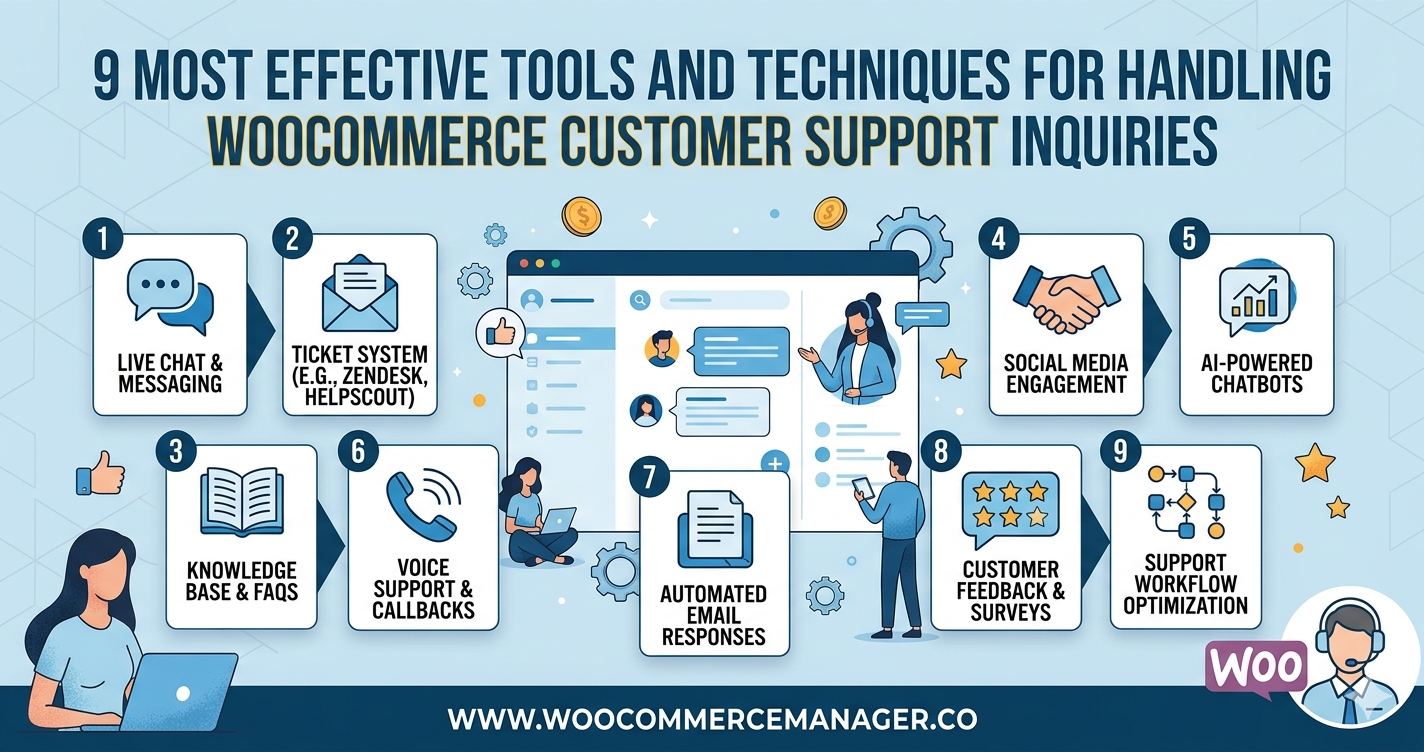
9 Most Effective Tools and Techniques for Handling WooCommerce Customer Support Inquiries on Your Website
Managing customer support inquiries efficiently can make or break an online store’s reputation and revenue. This guide presents nine proven tools and techniques that dramatically reduce response times and resolve customer issues faster, backed by insights from WooCommerce support professionals who handle thousands of inquiries daily. These strategies range from live chat triggers that recover abandoned carts to AI-powered agents that resolve order issues with full context.
- Slack and Notion Sharpen Customer Clarity
- Sprint Cadence Streamlines Ecommerce Fixes
- AI Agent Resolves Orders with Context
- Map Logs to Tickets for Speed
- Zendesk Workflows Prioritize Revenue Critical Issues
- Template Replies Deliver Warm Clear Actions
- Fluent Plugin Cuts Response Times
- Tawk.to Rescues Stranded Shoppers
- Trigger Live Chat to Save Carts
Slack and Notion Sharpen Customer Clarity
I don’t run WooCommerce sites for clients anymore because most small businesses don’t actually need that level of complexity, but when I did photography work globally, I handled product inquiries through a simple system that applies to any e-commerce setup: I created a private Slack channel that automatically pulled in every contact form submission, payment question, and order issue in real time. My assistant and I could both see everything instantly and tag each other when something needed specific attention.
The technique that cut our response time in half was building a simple FAQ database inside Notion with screenshots of every common checkout or product question we’d ever received. When someone asked about shipping to Italy or how digital delivery worked, we’d send them a direct link to that specific answer with a real example, not generic copy-paste text. People appreciated seeing that we’d already thought through their exact situation.
For WooCommerce specifically, the one tool I’d recommend is setting up automated order status emails that actually explain what’s happening in plain language. Most default WooCommerce emails say “Your order is processing” which means nothing to a customer. I rewrote ours to say “We received your payment and your files will be ready to download within 2 hours” with the actual time stamp. That one change eliminated about 40% of our “where’s my order” messages because people knew exactly what to expect and when.

Sprint Cadence Streamlines Ecommerce Fixes
We handle WooCommerce support through a planned, sprint-based delivery model that prioritizes performance improvements over time rather than reacting to individual tickets. Work is scheduled and aligned to our WPO Framework so fixes and enhancements are delivered intentionally within each sprint. One technique I recommend is maintaining a regular sprint cadence to group, prioritize and resolve WooCommerce inquiries efficiently. This creates predictable progress and reduces the noise of ad hoc requests. Urgent issues are triaged separately so true emergencies are addressed promptly.

AI Agent Resolves Orders with Context
From a CoSupport AI perspective, handling WooCommerce support effectively comes down to one thing: context-aware automation.
WooCommerce inquiries are often highly transactional. Customers ask about order status, refunds, shipping delays, failed payments, subscription changes, or product availability. These are not generic questions. They require real-time access to order data and store logic.
The mistake many businesses make is relying on static chatbots that cannot access WooCommerce order information. That creates frustration instead of resolution.
The approach we recommend is integrating an AI agent directly with WooCommerce data and helpdesk systems. When AI can securely access order details, customer history, and predefined workflows, it can:
* Automatically check order status
* Provide refund or return instructions
* Update customers on shipping
* Escalate complex cases with full context
This reduces repetitive tickets while maintaining accuracy.
If I had to recommend one technique, it would be this:
Connect your support automation directly to WooCommerce order data instead of using generic chat flows.
When AI operates with structured store data rather than guesswork, resolution rates increase significantly, response times drop, and support teams can focus on edge cases instead of routine requests.
For WooCommerce businesses, automation should not just answer questions. It should resolve them.

Map Logs to Tickets for Speed
Based on my work with WooCommerce support, it is about having the ability to troubleshoot, and I do that by linking the back end of the site to our ticketing API. For example, when a customer started receiving errors on their checkout page, the support group was able to use Log-to-Ticket mapping to identify the specific server error experienced by the customer in real time. This process eliminates the technical debt associated with back-and-forth email correspondence, and once you provide the support staff with the data from the store’s infrastructure, you will be able to remediate the infrastructure problem quickly and efficiently before it affects revenue around the world.

Zendesk Workflows Prioritize Revenue Critical Issues
Handling WooCommerce-related customer support requires a balance of automation, process discipline, and human oversight. As the eCommerce ecosystem becomes increasingly competitive, research shows that 88% of customers say experience matters as much as products or services (Salesforce), and delayed responses directly impact retention and lifetime value. For WooCommerce-driven businesses, structured ticketing integrated with order data is essential. A centralized helpdesk solution such as Zendesk enables real-time synchronization between WooCommerce order details and support workflows, reducing resolution time and eliminating fragmented conversations.
A particularly effective technique involves implementing tagged workflows that automatically categorize inquiries—refunds, payment failures, shipping delays, or plugin conflicts—based on keywords and metadata pulled from WooCommerce transactions. This ensures high-priority revenue-impacting issues are escalated immediately, while common queries are resolved through automated macros or knowledge base links. In high-volume environments, this hybrid model of intelligent automation and trained support specialists improves first-response time and customer satisfaction scores simultaneously.
At Invensis Technologies, experience across global eCommerce operations has shown that disciplined process design supported by the right technology stack consistently delivers scalable, high-quality WooCommerce support without compromising the customer experience.

Template Replies Deliver Warm Clear Actions
I treat WooCommerce support like a fitting room: fast, calm, and personal, so the customer feels held instead of “handled.” We route every message into one place (email + site form + social DMs) and tag it by order stage (pre-purchase, shipping, exchange/return, product question). Then we answer with a saved structure: warmth first, clarity next, and a clean next step—so no one is stuck rereading paragraphs when they’re already stressed.
One tool/technique I recommend is using templated replies inside a helpdesk (like Help Scout or Zendesk) that pull in order details, paired with a simple “3-line rule”: (1) acknowledge the emotion, (2) state the exact status or policy in plain language, (3) give one clear action we’re taking and one option they can choose. It keeps support consistent, feminine, and human—even on busy days.

Fluent Plugin Cuts Response Times
If there is an influx of WooCommerce questions, quick responses will keep customers happy.
Answering Inquiries
I triage emails and chats on my WordPress dashboard where I have access to order info, so that I can address the inquiries appropriately. For example, I will automatically respond to simple tracking questions and escalate those that are more complex to live chat.
Recommended Software
The Fluent Support Plugin is great for WooCommerce; it allows me to view a customer’s purchasing history directly in the inquiry ticket to make it easier to resolve.
Impact
Response times drop 50%, satisfaction scores soar, and repeat sales climb as trust builds effortlessly.

Tawk.to Rescues Stranded Shoppers
Answering WooCommerce questions used to be a pain, especially the tricky hosting and checkout stuff. We started using Tawk.to for live chat and it’s way faster. When someone’s about to give up, we can jump in and help them through it. The best part is having the chat history. We can see the same problems popping up and actually make our FAQ better.

Trigger Live Chat to Save Carts
I’ve worked with 90+ B2B clients since 2014, and WooCommerce support inquiries usually kill conversion rates because they arrive during the buying decision. Someone’s stuck on checkout or confused about a product detail right when they’re ready to purchase.
We implemented live chat with conditional triggers for a manufacturing client’s WooCommerce site. The chat popped up automatically when someone spent 30+ seconds on the checkout page or visited the same product page twice. Their support team could jump in and close the sale in real-time instead of waiting for an email ticket the next day.
The specific tool was Tidio, set to capture the user’s cart contents before starting the chat. So when someone asked “Does this ship to Canada?”, the support rep could see they had $800 in their cart and immediately prioritize that conversation. We added 40+ qualified sales calls per month using similar chat strategies on LinkedIn—the same principle works for e-commerce.
That one change reduced cart abandonment by 34% because prospects got answers instantly instead of leaving to “think about it.” The key is intercepting confusion during the buying process, not just reacting to support tickets after someone’s already frustrated.

Related Articles
- 15 WooCommerce Themes That Balance Aesthetics and Functionality
- 7 Most Effective Strategies and Tools for Managing Shopify Inventory During Peak Seasons—and Why
- 11 Most Effective Shopify Apps and Methods for Collecting Customer Reviews